AI TOOL / #03266
Scribo Pronto
Scribo Pronto simplifies grading and feedback for teachers and provides students with instant writing feedback.
Introduction
Scribo Pronto streamlines grading and feedback for teachers and provides instant writing feedback for students.
What is the Scribo Pronto AI Chrome extension/plugin?
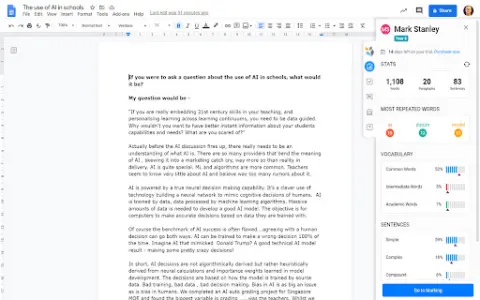
Scribo Pronto is designed to make grading and feedback convenient for English and humanities teachers, offering instant text analysis and AI-suggested feedback within Google Docs. Teachers can customize feedback, grade using rubrics, and insert all annotations into student documents with one click. It also supports students by providing instant feedback to help them improve their writing skills.
How do I use the Scribo Pronto AI Chrome extension/plugin?
Pronto launches automatically within Google Docs and provides an analysis of student writing. Teachers can add, edit, or use AI-generated feedback, grade against rubrics, and insert the analysis, annotations, and feedback into the student’s document with one click. Students can access Pronto while writing to receive instant feedback.
Core features of the Scribo Pronto AI Chrome extension/plugin
Automated student text analysis
Feedback on AI suggestions
Customizable feedback options
Rubric-based scoring
Insert feedback into Google Docs with one click.
Integration with Google Classroom
Provide students with immediate feedback.
Related
MuseMate
Creating short music videos for independent musicians to use for promotional purposes
AgentMsgr
Bring AI agents from different platforms together into a group chat.
AlterContacts
Help consultants keep track of each customer’s AI relationship assistant.
AdBuddy
Tencent Marketing’s Conversational Placement Assistant
MAI Image 2.7
Microsoft's self-developed image generation and editing model
creator
The most commonly used engine for developing mini-games in China comes with a Chinese interface and documentation. In the construction panel, there is directly an option called “WeChat Mini-Games”; simply click on it to start developing your game. For 2D projects, virtually no additional adjustments are required, making it the easiest starting point for beginners. 004 Cocos Creator 3.8 Documentation