AI TOOL / #03900
AiAsk Summary
A Chrome extension tool that extracts article outlines to improve reading and research efficiency.
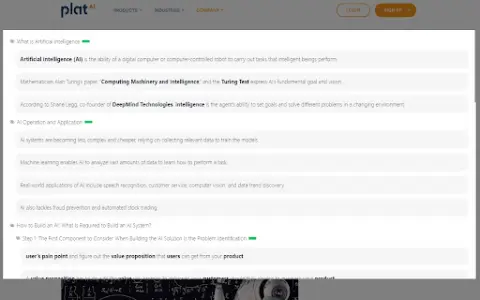
Introduction
Chrome extension that extracts outlines from articles for enhanced reading and research.
What is the AiAsk Summary AI Chrome extension/plugin?
AiAsk Summary is a Chrome extension designed to enhance your reading and research experience. It cleverly extracts the main outline of any article you browse, providing a structured overview of its content.
How do I use the AiAsk Summary AI Chrome extension/plugin?
1. Browse: Open any article in the Chrome browser.
2. Activate: Click the icon in the browser toolbar or the icon on the right side of the page.
3. Extract: This extension analyzes the article and displays a concise outline.
Core features of the AiAsk Summary AI Chrome extension/plugin
Automatic outline generation
User-friendly interface
Improve reading efficiency
Supports YouTube videos
Show detailed content when the outline is ready.
Related
UniConverter AI
A high-speed video conversion, compression and editing tool with AI enhancements.
Echonotes
Echonotes converts speech into text, enabling quick and organized note-taking while also providing AI-assisted support.
SayAI
Extensions for ChatGPT that support voice input and audio output.
transcribe4u
AI-powered speech-to-text app for converting audio files to text.
DoThread
A simple, privacy-focused app for organizing notes, tasks, and ideas into time-based threads.
Vocaldo AI
An AI-powered speech-to-text platform that supports multiple languages and enables rapid transcription.