AI TOOL / #04050
AI Roundtable
Ask a question and receive answers from multiple AI assistants.
Introduction
Ask one question, get answers from multiple AI assistants.
What is a Multiple AI Assistants Chrome extension/plug-in?
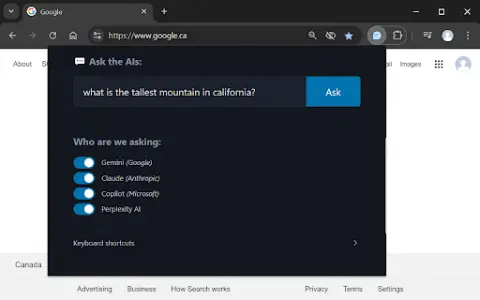
This website allows users to submit questions at once and receive answers from multiple AI assistants. Users can customize which assistant they want to use for their queries. The website also provides keyboard shortcuts, making it easy to access various functions quickly.
How to use the Multiple AI Assistants Chrome extension?
Use the shortcut keys Ctrl/Cmd + Shift + Q to open the query window and start typing your question. Use Alt + 1 to switch to Gemini, Alt + 2 to switch to Claude, Alt + 3 to switch to Copilot, and Alt + 4 to switch to ChatGPT.
The core functions of various AI Assistant extensions/plugins for Chrome.
Query multiple AI assistants simultaneously
It is possible to customize the selection of AI assistants.
Convenient and fast keyboard shortcuts
Related
Dubai AI
AI tool for predicting real estate prices in Dubai, with detailed explanation.
Fluid – AI stock updates
AI-driven stock summaries from the Reddit community, delivered via Discord or email.
Socap.ai
Online learning platforms that offer business, creative, and technical skills.
EasySushii
EasySushi provides crypto market insights without coding, including historical data, charts, and AI analysis.
StartupStudio-AI
Artificial intelligence-based personalized investment planning and financial guidance tools.
Yomii.app
An AI-powered platform that simplifies real estate investing.