AI TOOL / #04208
Shift-Ctrl-F: Semantic Search for the Browser
A Chrome extension that uses MobileBERT to search for and highlight answers on web pages.
Introduction
Chrome extension using MobileBERT to search and highlight answers on webpages.
What is the Shift-Ctrl-F Chrome extension/plugin?
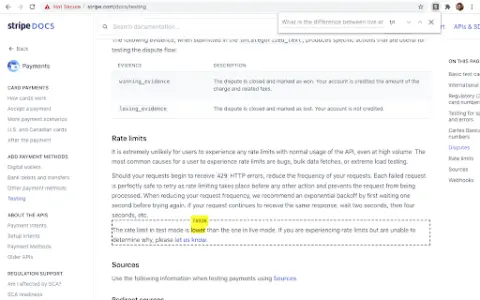
Shift-Ctrl-F is a Chrome extension that utilizes the MobileBERT model, which has been fine-tuned using the SQuAD dataset. This extension uses TensorFlowJS to search for answers on web pages and identify relevant elements. It allows users to enter natural-language queries and find corresponding answers within the content of the current page.
How to use the Shift-Ctrl-F Chrome extension/plugin?
1) Open the extension pop-up window using the toolbar or shortcut key (Shift-Ctrl-F).
2) Enter your natural language query in the search box.
3) Press Enter and wait for the model to return the results.
The core functionality of the Shift-Ctrl-F Chrome extension/plug-in.
Conduct natural language question-and-answer interactions on web pages.
Highlight relevant elements based on the search query.
Efficient processing using MobileBERT
Related
Hakko AI
HakkoAI is a desktop anime AI companion designed for gamers, offering support and interaction.
Consistent Character Generator
An AI tool used to generate consistent character images with customizable features from a single photograph.
Ongkanon
An AI chatbot platform that comes equipped with a personalized AI companion.
DiscordPal
DiscordPal provides AI-based virtual girlfriends to enhance the personalized chatting experience, specifically designed for the Discord platform.
Dippy Widget – AI Character Chat
Dippy provides AI friends and characters for chat, role-playing and personalized encouragement.
rekor.ai
Rekor provides AI-driven road intelligence through data collection, analytics, and software solutions.