AI TOOL / #05985
Voiceboost – ChatGPT
A Chrome extension designed for voice-controlled interaction with ChatGPT.
Introduction
Chrome extension for voice-controlled ChatGPT interaction.
What is the Voiceboost AI Chrome extension/plug-in?
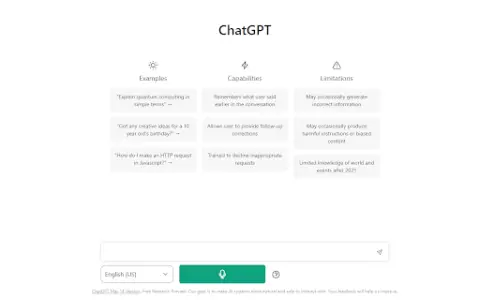
Voiceboost is a Chrome extension that allows users to interact with ChatGPT via voice commands. It adds a button below the input field; by clicking this button, the system captures the user’s verbal inquiries and sends them to ChatGPT for responses. This provides a hands-free alternative for entering text.
How to use the Voiceboost AI Chrome extension/plug-in?
Click the button added below the input area to start recording your voice input. Alternatively, use the keyboard shortcuts: Ctrl+Shift+S (Windows) or Command+Shift+S (Mac) to begin recording, and Ctrl+Shift+E (Windows) or Command+Shift+E (Mac) to stop and submit the recording. Make sure to grant microphone access when prompted.
The core functionality of the Voiceboost AI Chrome extension/plugin
Voice input for ChatGPT
Keyboard shortcuts for voice capture and submission
Related
WebsCrypto
WebsCrypto provides cryptocurrency news, market analysis, opinions and price data.
Alova
AI news app with updates, insi...
WeStart.ai
The homepage for news, design updates, and technological developments in the field of artificial intelligence.
FlashFeed
AI-powered news applications that provide fast, personalized summaries and audio updates.
icai.ai
ICAI: an AI innovation center connecting Dutch academia, industry, and government.
BeatJar
Artificial intelligence-based services that create customized personalized songs based on the stories you share.