AI TOOL / #06632
Talk to GPT
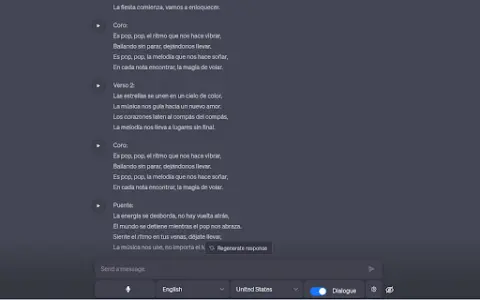
A Chrome extension designed for voice interaction with ChatGPT, supporting multiple languages and error correction features.
Introduction
Chrome extension for voice interaction with ChatGPT, supporting multiple languages and error correction.
What is the Talk to GPT AI Chrome extension/plug-in?
“Dialogue with GPT” is a Chrome extension that enables users to interact with ChatGPT on chat.openai.com via their microphone. It utilizes the browser’s speech recognition API to convert spoken audio into text and supports multiple languages. Users can also adjust the language settings and enable ChatGPT’s error-correction functionality.
How to use the Talk to GPT AI Chrome extension/plug-in?
Install the Talk to GPT Chrome extension. Visit chat.openai.com and use your microphone to utter your query. This extension will transcribe your voice and send it to ChatGPT.
The core functionality of the GPT AI Chrome extension/plug-in.
Provide voice input for ChatGPT.
Multi-language support
Language level adjustment
ChatGPT corrects errors.
Related
TTS Text To Speech – Voice Reader Online
AI tools are used for text-to-speech conversion and text summarization.
TopMediai®
AI-powered online media tool for video, audio and photo editing.
AI Coffee Club
An integrated AI content generation platform that offers tools for text, images, code, chat, and voice processing.
Ahoy for Chrome – Voice composer for Gmail
It allows sending emails via voice, and includes real-time transcription and recording features.
Prompt Speak
AI-driven applications are used to create and enhance written communications, as well as to automate social media management.
Sanchay.ai
Use AI for automated video content processing.