AI TOOL / #07177
Chrome Virtual Camera
Use the clock, video file, and background masking options in place of getUserMedia().
Introduction
Replaces getUserMedia() with clock, video file, and background masking options.
What is the getUserMedia() Replacement AI Chrome extension/plug-in?
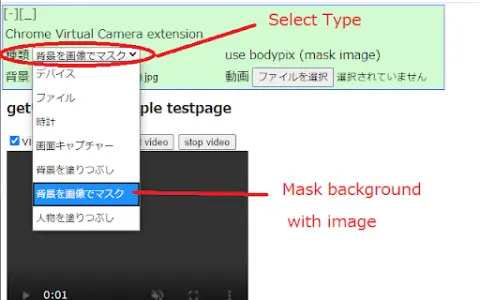
This tool replaces the standard getUserMedia() function, enabling the use of clocks, video files, as well as the tfjs/body-pix technology as background masks for video sources.
How to use the getUserMedia() Replacement AI Chrome extension/plug-in?
This tool intercepts calls to the getUserMedia() function and provides alternative video sources, such as clocks, video files, or video streams with masks using tfjs/body-pix. The specific implementation and configuration details depend on the particular library or technology being used.
The core functionality of the getUserMedia() replacement AI Chrome extension/plug-in
Replace the getUserMedia() function
Provide a clock as the video source.
Provide a video file as the source material for the video.
Implement background masking using tfjs/body-pix.
Related
Tencent Lighthouse AI
Tencent's AI Data Analysis Platform
Zhiyuan AIMA Open Platform
Zhiyuan Robot's Embodied Intelligence Development Platform
Vibeconferencing
Invite your AI robot to join the video conference.
outages.live
Real-time service failure stream provided to AI agents
135 Vision
The complete set of visual materials Agent under the 135 Editor framework
Kleos
AI marketing outsourcing teams for small businesses