AI TOOL / #07222
ReadImage
Extract, edit, and copy text from images on web pages.
Introduction
Extracts, edits, and copies text from images on web pages.
What is Image Text Extractor ai chrome extension/plugin?
This extension allows users to extract text from images displayed on web pages. It supports common image formats such as jpg, jpeg, png and bmp. After extraction, the text can be edited and copied.
How to use Image Text Extractor ai chrome extension/plugin?
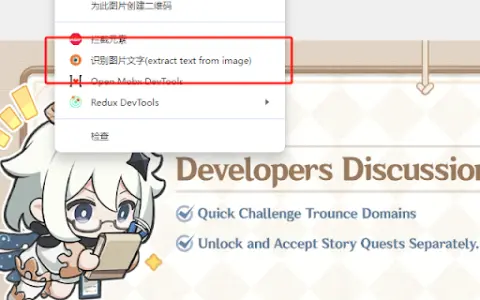
Hover your mouse over the image, right-click and select "Extract text from image". Press "Ctrl + Q" to view the extracted text on the extension page, where it can be edited and copied.
Image Text Extractor ai chrome extension/plugin core features
Extract text from images on web pages
Edit extracted text
Copy extracted text
Related
Pippit AI
An intelligent content creation agent that uses AI-driven tools to optimize and enhance the production of content.
Fresho
An artificial intelligence-based marketing assistant designed to automate the management of Google Ad campaigns.
CopyFrog.AI
An AI-based content creation platform that enables the generation of text, images, and advertisements.
CopyGenius
An artificial intelligence-based tool designed to generate marketing copy, product descriptions, and blog content.
Aiter.io
AI Marketing Assistant – Quickly generates advertising ideas, content, and strategic concepts.
adxcel.com
An AI-based marketing automation platform that provides cross-channel attribution and personalization.