AI TOOL / #07976
Window AI
A platform that connects AI models to the internet, utilized for text and 3D creation.
Introduction
Platform connecting AI models to the web for text and 3D creation.
What is a Windows AI Chrome extension/plug-in?
Window is a platform designed to integrate AI models into various networks, enabling users to utilize a wide range of models for text generation and 3D creation. It allows users to bring in their own models, including those running locally, and use them across different applications. For developers, Window eliminates the need to rely on specific language model APIs such as OpenAI, facilitating the development of model-independent and multimedia AI applications – all of which are available for free trial. Model providers, in turn, can gain access to a broader user base without requiring developers to make any modifications to their code.
How to use the Window AI Chrome extension/plug-in?
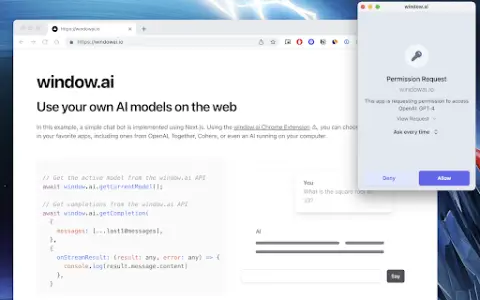
Last time, you configured your model through the Window interface. Web applications may request your permission to send notifications regarding the models you have selected. You will be able to see what information is being requested and at what time it will be done so.
The core functions of the Window AI Chrome extension/plug-in
Connect the AI model to the network.
Supports text generation and 3D creation.
Model-independent application development
User control over and visibility of the model’s usage
Related
Cokeep
Cokeep is an artificial intelligence-powered learning tool that helps users concentrate and retain knowledge.
Mintlify
A documentation platform that integrates AI, beautiful design, and developer-friendly features.
SkillMapper: Social Highlighter & Bookmarker
A learning center and a Chrome extension designed to help users save, organize, and discover learning materials.
Kili.so
Kili helps businesses use AI to respond to customers faster by importing knowledge.
FuseBase Clarity – Capture Step-by-Step guides, SOP and tutorials
Screen recording tool that automatically creates guides with AI editing and sharing capabilities.
ThinkerNotes
ThinkerNotes enables content creators to generate original ideas from notes, insights, and knowledge derived from links.