AI TOOL / #08846
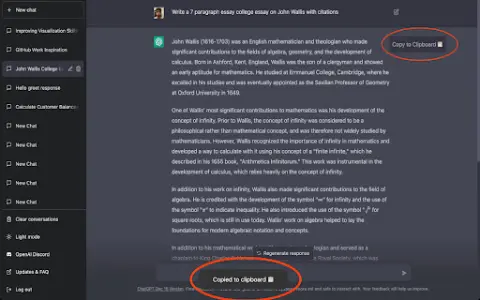
Copy for Chat GPT
An extension used to copy ChatGPT responses and check for plagiarism.
Introduction
Extension to copy ChatGPT responses and check for plagiarism.
What is the Plagiarism Detector Extension for Chrome – an extension/plug-in for Google Chrome?
This extension allows you to copy the responses generated by ChatGPT by clicking a button or using the CMD+K shortcut key, and then have those responses checked by plagiarism detection tools.
How to use the Plagiarism Detector Extension for Chrome?
You can use this extension by clicking the copy button on ChatGPT’s response or by pressing CMD+K. The copied text will be automatically checked to determine whether it contains any plagiarized content.
The core functionality of the Plagiarism Detector Extension for Chrome.
One-click to copy the response from ChatGPT
Use the CMD+K shortcut key to copy.
Automatic plagiarism detection
Related
Translate.Photo
AI image-to-text translation tool that translates design content into 75+ languages and maintains brand consistency.
Receipt-AI for Startup
A receipt management tool that uses AI, text messaging, and email to make expense tracking easy.
AI Drive
Artificial intelligence-powered cloud storage that is used for summarizing files, engaging in chat with them, and organizing their content, all by leveraging advanced AI models.
TranslateAir
AI-driven translation and OCR tools suitable for macOS.
Yomitai
Yomitai is a Japanese-language reading assistant that helps users identify and read Japanese text contained within images.
ScreenRedact
A Mac application designed to use local machine learning techniques to identify and highlight text within images.